ScribeFire在Blogger上出错的解决
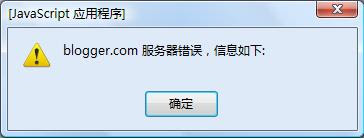
在ScribetFire上添加Blogger帐户的时候,会有下面的错误:

现在找到一个变通的方法,就是利用HTTPS安全链接。
我现在用的是Firefox的插件ScribeFire,其他编辑器可以照葫芦画瓢,都试试。
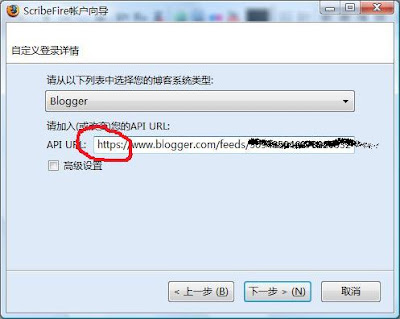
如果是添加帐户过程中,将下图红圈中的http改为https就行了:

如果以前已经有帐户,选中需要修改的帐户,点编辑,讲下图红圈中的http改为https就可以了:

经过这么修改就可以用了。不过这个编辑器还不支持直接往Blogger上传照片(这点不如M$的Livewriter,不过Livewriter我怎么弄就还是不行,提示基础连接已关闭。),我是结合一个叫fireuploader的插件往picasaweb上传照片,然后在插入连接。
更正:scribefire已经支持直接向Blogger上传图片了,它会在picasaweb里建一个不公开的相册,把图片都放在里头。这下完美了~~哦也,严重推荐该编辑器。
ScribeFire下载:>>>Download< <<
Fireuploader下载:>>>Download< <<
上广告了
其实是为了整一个可以用google帐户登录的的feedburner,这玩意目前需要开通Adsense才行。
昨天提交的申请,网上说现在Adsense申请要求很严格,还以为没戏了。不过今天下午,收到邮件说验证通过,运气还是不错的。
在开通Adsense for feed 后,就可以用google帐户登陆google下的feedburner了。用自定义域名绕墙,一切OK。Feed地址为http://feeds.yulei666.com/yulei666,以前的地址会blogger会自动跳转。
不过正如可能吧的这篇文章写得,feed上的广告只在google的阅读器下显示,在其他阅读器上还是空白一片。
I join the Adsense program to get an google’s feedburner account. It is said that, it’s difficult to apply an Adsense now, but fortunately, I receive the accept letter from google this afternoon.
There are some problem when using the service Adsense for feed. The advertisement can only display in google reader, while you can see nothing in other feeds reader. And the domain “feedproxy.google.com” is blocked in China main land for something reasons, I must use the custom domain with the service “Mybrand”.
New feed address: http://feeds.yulei666.com/yulei666